Tablets have quietly become the most useful "second screen" in an Indian home. They are big enough for Netflix, comfortable for reading and note-taking, light enough to hand to a child, and increasingly powerful enough to replace a laptop for email, browsing and light office work. But the market is confusing: the same 5,000 rupee gap can mean the difference between a device that lasts four years and one that feels sluggish in six months.
This guide is built for everyday buyers, not spec-sheet enthusiasts. The goal is to help you match a tablet to how you will actually use it, so you neither overpay for power you will never touch nor underbuy and regret it. Almost every tablet you will consider runs Android (or a China-market skin of it), with Apple's iPads sitting in their own premium lane.
A few honest truths up front: cheap tablets age fast, most people never need cellular (SIM) models, and the single biggest cause of buyer's regret is buying too little storage and RAM to save a thousand rupees. Read the "what matters" section, pick a budget band, and you will avoid nearly every common mistake.
Our top tablets picks right now

Apple iPad Pro 11-inch (M5)
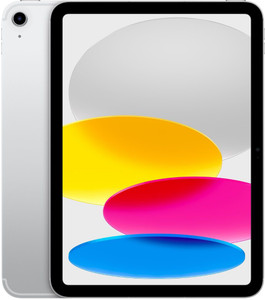
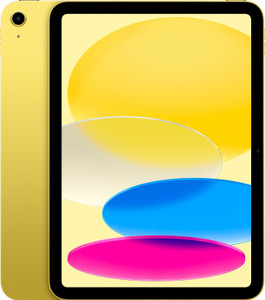
Apple iPad (11th Gen, A16)
Want the full ranked list with filters and live prices?See all tablets ranked ›
What actually matters when buying tablets
What to expect at each budget
Who it’s for — the right tablets by person
Common mistakes to avoid
- Buying too little RAM and storage to save a thousand rupees. A 4GB/64GB tablet feels full and slow within months. Spend the little extra for 6-8GB RAM and 128GB — it is the upgrade you will feel every single day.
- Chasing screen size over screen quality. A big 10-inch panel at low HD resolution looks worse than a smaller sharp Full HD screen. Text clarity and panel type matter more than raw inches.
- Paying for a cellular (SIM) model you will never use. Most people are on Wi-Fi at home and can tether from their phone outdoors. The Wi-Fi-only version is cheaper and does the same job for 90% of buyers.
- Ignoring the chipset and trusting only the brand or the marketing name. A fancy-sounding tablet with a weak Helio-class chip will age badly. Look up the exact processor before buying.
- Forgetting about software updates. A cheap tablet stuck on an old Android version with no update promise becomes a security and app-compatibility headache. Check the update policy.
- Assuming the stylus and keyboard are included. On most tablets these are sold separately and can add ₹5,000-15,000. Budget for accessories if productivity is your goal, and confirm the pen is a real pressure-sensitive active stylus.
Tips for buying in India
- Buy during major sale events — Flipkart's Big Billion Days and Amazon's Great Indian Festival (both around Sept-Nov), plus Republic Day and summer sales. Tablets routinely drop 15-30%, and bank card offers plus no-cost EMI stack on top. If you can wait a few weeks for a sale, do.
- Prefer buying from the brand's official store or a large authorised seller so warranty claims go smoothly. For imported or grey-market units, service and warranty in India can be a nightmare — check that the warranty is India-valid before you pay.
- Check service-centre availability for your city. Samsung, Apple, Lenovo and Xiaomi have wide service networks; some smaller or newer brands do not. A cheap tablet is no bargain if the nearest service centre is in another state.
- Use no-cost EMI on credit or debit cards for the mid and premium bands — it spreads a ₹30,000 purchase across months without extra interest during sales, and stacked bank discounts often knock off another few thousand rupees.
- Buy a case and screen protector from day one, especially if the tablet will be used by kids. A ₹500 case can prevent a cracked screen that costs a third of the tablet's price to repair.
- Most people should buy the Wi-Fi-only model and tether from their phone's hotspot when out. The cellular/LTE variant usually costs Rs 5,000-8,000 more, needs its own SIM and data plan, and most tablets rarely leave home Wi-Fi — only pay for cellular if you genuinely use data on the move every day.
- Check for a microSD slot before paying for extra storage. Most Android tablets take a card, so a 128GB model plus a cheap microSD is far better value than jumping to 256GB. iPads have no card slot, so on an iPad you must buy enough storage upfront — you can't add it later.
- Budget for accessories separately, because they add up fast. A stylus, keyboard folio, case and screen guard can easily add Rs 3,000-15,000 on top of the tablet, and first-party pens (Apple Pencil, S Pen) cost more but work far better than generic ones. Also check the in-box charger's wattage — many tablets ship with a slow charger.
- Confirm the exact RAM/storage variant before checkout — listings often advertise the cheapest configuration's price, but the 8GB/128GB version you actually want costs more. Then stack exchange offers, no-cost EMI and bank-card discounts, which combine on Amazon and Flipkart to cut the effective price.
Frequently asked questions
Should I buy an Android tablet or an iPad?
For most Indian buyers on a budget, a mid-range Android tablet gives far better value for streaming, browsing and casual use. Choose an iPad if you are already in Apple's ecosystem (iPhone, AirPods), want the longest software support, or need it for serious drawing, editing or note-taking — the app quality and stylus experience are still the best there. Just know iPads start higher and accessories are pricey.
Is a tablet enough to replace my laptop?
For email, browsing, video calls, watching content and light document editing — yes, especially a premium tablet with a keyboard. For heavy multitasking, coding, spreadsheets with macros, or specific Windows software, no. Be honest about your real workload; many people buy a productivity tablet and still reach for the laptop for the hard tasks.
How much RAM and storage do I really need in 2026?
Treat 6GB RAM and 128GB storage as the sensible minimum for a device you want to keep 3-4 years. 8GB is comfortable for multitasking. If the model supports a microSD card, you can add cheap storage for movies and photos later, but you cannot upgrade RAM — so get enough of that up front.
Do I need the cellular (SIM) version?
Usually not. If you are mostly at home or in offices with Wi-Fi, the Wi-Fi-only model is cheaper and you can share your phone's mobile data (hotspot) when travelling. Buy cellular only if you genuinely need always-on connectivity away from Wi-Fi and don't want to tether — for example, for someone who won't manage a hotspot.
Is it worth waiting for a sale to buy?
Yes, if you can. Tablets see their steepest discounts during Big Billion Days, Great Indian Festival, and Republic Day sales. Between bank offers, no-cost EMI and exchange bonuses, you can save several thousand rupees. If you need one urgently, buy now — but for a planned purchase, timing it to a sale is one of the easiest ways to save money.
Which brands are reliable in India for service and updates?
Samsung offers the widest service network and the best long-term Android updates. Apple's service and longevity are excellent but premium-priced. Lenovo and Xiaomi offer strong value with decent service reach. Be more cautious with very cheap or lesser-known brands — verify India-valid warranty and a nearby service centre before buying.
Which tablet is best for a college student in India?
For most students a Wi-Fi iPad 10th gen (around Rs 27,000) is the safe pick — smooth for years, excellent note-taking apps like GoodNotes and Notability, and the widest college-app support. If you're on Android or a tighter budget, the Redmi Pad Pro or OnePlus Pad Go (Rs 22,000-27,000) give a bigger, sharper screen for reading PDFs. Get 128GB storage, budget Rs 2,000-5,000 for a stylus, and add a keyboard case only if you type long assignments.
What's a good tablet for elderly parents?
Go for simplicity and a bright, easy-to-read screen rather than power. A Samsung Galaxy Tab A9+ or Redmi Pad SE (Rs 13,000-17,000) with a light body works well, and Samsung's One UI has an Easy Mode with larger icons and text. If they mostly video-call family on iPhones, an iPad 10th gen makes FaceTime effortless. Set it up for them first — enlarge the fonts, pin favourite apps, and choose the Wi-Fi-only model to avoid data-plan hassles.
What tablet should I buy for my child's first tablet?
Buy inexpensive and rugged, not powerful. A Lenovo Tab M9 or Samsung Galaxy Tab A9 (Rs 9,000-13,000) is plenty for learning apps, cartoons and YouTube Kids, and hurts less if it's dropped. Add a shockproof kids' case, use Google Family Link or Samsung Kids for screen-time and content limits, and always pick the Wi-Fi model — a child doesn't need a SIM.
I want to draw and take handwritten notes — which tablet works best?
You need proper stylus support and a laminated display. The iPad Air (M3) with Apple Pencil Pro (roughly Rs 60,000 plus the pen) is the best all-round choice for Procreate, sketching and neat notes; for Android value, the Xiaomi Pad 7 or a Samsung Galaxy Tab S-series (some bundle the S Pen) do the job for less. Avoid cheap tablets with basic styluses — tilt, pressure sensitivity and palm rejection are what make writing feel natural.
Best tablet for watching movies on long flights and train journeys?
Prioritise a bright 11-12 inch screen, quad speakers, a big battery and storage you can fill with offline downloads. A Redmi Pad Pro or OnePlus Pad Go (Rs 22,000-27,000) with a microSD card lets you carry plenty of Netflix and Prime content — just download over Wi-Fi before you leave. A Wi-Fi-only model is fine, since you won't have signal at 35,000 feet anyway.