Your Wi-Fi router is the single device every phone, laptop, TV, and smart bulb in your home depends on, yet it's usually the thing people spend the least time choosing. In 2026, most Indian homes are on fibre plans of 100 Mbps to 1 Gbps (JioFiber, Airtel Xstream, ACT, BSNL and local ISPs), and the cheap router your ISP handed you for free is often the reason your speed test looks fine but video calls in the back bedroom still stutter.
The good news: you rarely need to spend a fortune. The right router depends far more on your home's size and layout, the number of devices you run, and your actual broadband speed than on the biggest number on the box. A 2BHK flat has very different needs from an independent house across three floors.
This guide explains, in plain language, what the specs actually mean, what to expect at each price in rupees, and the mistakes that quietly waste your money. The aim is a router that just works, in every room, for the next four to five years.
Our top routers picks right now
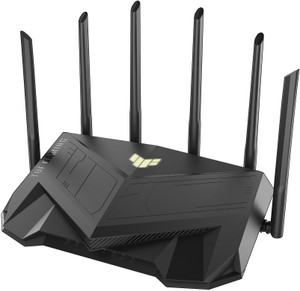
ASUS TUF Gaming AX5400 (TUF-AX5400)
ASUS ROG Rapture GT-AXE11000
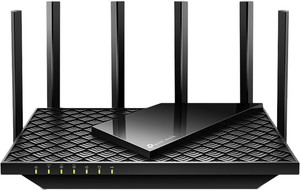
TP-Link Archer AXE75
Want the full ranked list with filters and live prices?See all routers ranked ›
What actually matters when buying routers
What to expect at each budget
Who it’s for — the right routers by person
Common mistakes to avoid
- Buying on peak speed alone: an AX6000 router will not fix a dead zone caused by walls - that is a coverage problem a single router cannot solve at any price. Match the type of hardware (single vs mesh) to your home first.
- Ignoring the Ethernet port speed: a router with 100Mbps (Fast Ethernet) ports will silently throttle your wired devices and even the WAN input on high-speed plans. On a 200Mbps+ connection this quietly wastes money you already pay your ISP.
- Overpaying for a plan the router can't use, or a router the plan can't fill: pairing a 1Gbps router with a 40Mbps plan gives no benefit, and vice versa. Buy for the speed you actually have.
- Trusting a range extender/repeater to fix everything: cheap extenders often halve speed and create a second confusing network name. A proper mesh system is the cleaner fix for large homes.
- Falling for a big brand-name box with an old chip: some cheap routers reuse years-old, underpowered internals. They test okay in the shop and then lag and need daily restarts. Read recent reviews for stability, not just specs.
- Keeping the free ISP router forever: these are usually the weakest hardware in the chain. If your Wi-Fi is patchy, replacing it is often cheaper and more effective than upgrading your plan.
Tips for buying in India
- Time big purchases (especially mesh systems) around Flipkart Big Billion Days and Amazon Great Indian Festival (Sept-Nov), plus Republic Day sales in January - networking gear routinely drops 20-40% and bank card offers stack on top.
- Check the connection type your fibre uses. Many Indian ISPs (JioFiber, some Airtel/ACT setups) hand you an ONT/modem and you connect your own router - confirm you need a router, not a modem-router combo, before buying.
- Buy from Amazon/Flipkart or an authorised seller and keep the invoice - warranty (usually 1-3 years, Asus and TP-Link often 3) is honoured via the brand's Indian RMA/service centre, and grey-market imports get rejected. Register the product on the brand app if offered.
- For most homes, place a single router centrally and high up (on a shelf, not inside a TV cabinet or on the floor) before assuming you need to spend more - placement alone often fixes weak signal.
- If you rely on the router for work-from-home, look for one that supports a USB 4G/5G dongle or has a mobile-hotspot failover option, given how common local fibre outages still are in many areas.
- Keep your Wi-Fi alive through power cuts: a small mini-UPS or DC-UPS (Rs 1,500-3,000) running your ONT and router together keeps internet up during load-shedding - useful for calls and CCTV when the mains drop. It's one of the cheapest, most India-specific upgrades you can make.
- Before you swap out the ISP's router, get your connection details from the provider - the PPPoE username/password, or whether you need bridge mode or a specific VLAN. Some ISPs (BSNL and several local fibre operators) also bind service to the old router's MAC address and need a quick call or technician re-provisioning before a new router will connect.
- For any 4G/5G SIM router, confirm it supports the Indian bands your carrier uses (Jio and Airtel lean on B40/B41 for 4G and n78 for 5G) and buy from an authorised Indian seller - grey-import units are often locked to foreign bands and will drop to poor speeds here.
- Give the router air. Indian summer heat inside a closed TV cabinet or a stuffy corner causes routers to throttle and randomly reboot; leave it in open space with clearance around the vents, and it'll stay stable and last longer.
Frequently asked questions
Do I even need to buy a router if my ISP gave me one?
Not always - but if you get weak signal in some rooms, drops during calls, or slowdowns when many devices are active, a better router is usually the cheapest fix and often beats upgrading your plan. ISP-supplied units are typically the most basic hardware available.
Wi-Fi 6 or should I wait/pay for Wi-Fi 7?
Buy Wi-Fi 6 unless you have a 500Mbps-1Gbps plan and Wi-Fi 7 phones/laptops to match. Wi-Fi 7's benefits only show up when both ends support it and you have the bandwidth. For a typical Indian home on 100-300Mbps, Wi-Fi 6 is the smart-money choice for the next several years.
One router or a mesh system?
Rule of thumb: single router for a 1-2BHK flat; mesh for a 3BHK+, a duplex, multi-floor independent house, or anywhere thick concrete walls create dead zones. No single router, however costly, beats a mesh for whole-home coverage in a large layout.
Will a costlier router increase my internet speed?
It cannot exceed the speed your ISP plan provides. A better router helps you actually reach that speed everywhere in the home and keeps it stable with many devices - but if you already get full speed near the router, spending more only helps coverage or device capacity, not raw speed.
What speed of Ethernet ports do I need?
If your plan is 100Mbps or less, Fast Ethernet is okay. Above 100Mbps, insist on Gigabit ports or your wired devices (and often the internet input) get capped. On 1Gbps fibre, look for a router with at least one 2.5G port to get the full benefit on a wired PC.
Which brands are reliable in India for service and updates?
TP-Link, Asus, Netgear and D-Link have established Indian service networks and push firmware updates over a product's life. TP-Link dominates the value segment; Asus is strong for enthusiasts and long warranty. Be cautious with ultra-cheap unknown brands that may lack security updates and after-sales support.
Which router is best for a college student in a hostel or PG?
First find out how your hostel gives internet. If it's a wired LAN port in your room, a cheap dual-band Wi-Fi 6 router (around Rs 2,500-3,000) turns it into personal Wi-Fi. If it's a shared captive-login Wi-Fi (the kind with a username/password page), a normal router usually won't work - a small travel router in repeater mode helps, but the cleanest option is a 4G/5G SIM router with your own data plan (Rs 4,000-7,000). Buy small and light so it's easy to carry between semesters.
What router should elderly parents living alone get?
Go for reliability and service over the latest specs. A single dual-band Wi-Fi 6 router from TP-Link, D-Link or Asus (Rs 3,000-4,500) with automatic firmware updates and an authorised Indian service centre is ideal. Do the one-time app setup for them, place it centrally and high up (not in a closed cabinet), and enable auto-updates so it stays secure without any effort on their part. Avoid mesh or gaming routers - more boxes just mean more things to confuse and troubleshoot over the phone.
We're a joint family in a large house - one powerful router or a mesh?
For a 3BHK+, a duplex or a multi-floor house with thick concrete walls, a mesh system (two or three units under one Wi-Fi name) beats any single router at any price - a single unit will always leave dead zones behind walls. A 2-pack Wi-Fi 6 mesh (around Rs 9,000-12,000) covers most Indian large homes; add a third node for three floors. Only choose one big router if your home is compact but packed with demanding devices.
I work from home - what's the one thing to get right?
Stability, and for that, run a wired Ethernet cable from your router to your desk - it removes almost every video-call drop and beats upgrading your Wi-Fi. Beyond that, pick a router with a capable processor so it doesn't need restarting, Gigabit ports if your plan is above 100Mbps, and ideally 4G/5G dongle failover given how common local fibre cuts still are. Rs 4,000-8,000 covers a genuinely dependable work-from-home setup.
Is a dedicated 'gaming router' worth it for a casual gamer?
Usually not. For lower ping, plugging your PC or console into a Gigabit LAN port with a cable does more than any gaming feature, and a good mainstream Wi-Fi 6 router (Rs 4,500-6,000) already includes QoS to prioritise game traffic. Dedicated gaming routers with 2.5G ports and fancy dashboards only earn their price if you're on a 500Mbps-1Gbps plan and insist on wireless play. No router can reduce ping to a game server that's physically far away.