Buying a printer in India in 2026 is less about brand loyalty and more about honestly answering one question: how many pages will you actually print, and of what? A student printing 20 pages a month, a home office churning out 500 invoices, and a family that mostly prints kids' project photos need three completely different machines. Get that wrong and you either overpay upfront or bleed money on cartridges for years.
The single biggest shift over the last few years is that ink tank printers (Epson EcoTank, Canon PIXMA G-series, HP Smart Tank, Brother InkTank) have become the default sensible choice for most Indian homes and small offices. They cost more to buy but drop the cost-per-page to a few paise instead of several rupees. Laser printers still win for heavy black-and-white text. Old-style cartridge inkjets now make sense only for very light, occasional use.
This guide keeps it plain: what specs genuinely change your experience, realistic INR budget bands for 2026, the mistakes that quietly cost you money, and India-specific advice on service, warranty and sale timing. No jargon left unexplained.
Our top printers picks right now
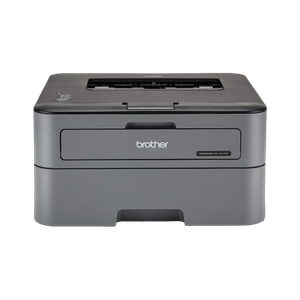
Brother HL-L2321D Monochrome Laser Printer
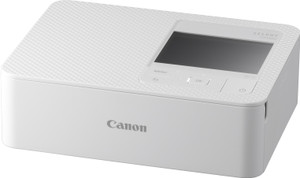
Canon SELPHY CP1500 Compact Photo Printer
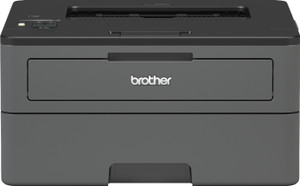
Brother HL-L2351DW Monochrome Laser Printer
Want the full ranked list with filters and live prices?See all printers ranked ›
What actually matters when buying printers
What to expect at each budget
Who it’s for — the right printers by person
Common mistakes to avoid
- Buying a cheap cartridge inkjet to save upfront money, then paying far more over time on overpriced cartridges. For anything beyond occasional printing, an ink tank pays for itself within months.
- Paying for colour when you only ever print text. A mono laser would have been faster, cheaper and lower-maintenance, and colour heads clog if left unused for weeks.
- Ignoring cost per page and duty cycle. People compare only sticker prices and end up with an under-built machine that jams, runs dry or breaks down under real usage.
- Using cheap third-party or refilled ink/toner during the warranty period. This is a leading cause of clogged heads and denied warranty claims, especially on inkjets.
- Assuming any printer will work smoothly with a phone. Confirm Wi-Fi and app/mobile printing support before buying, or you will be stuck tethered to one computer.
- Letting an inkjet or ink tank sit unused for long stretches. Dried, clogged print heads are common in Indian homes that print sporadically; a mono laser handles neglect far better.
Tips for buying in India
- Time big purchases with Flipkart Big Billion Days and Amazon Great Indian Festival (around Sept-Nov), plus Republic Day and Prime Day sales. Printers, and especially bundled ink, see genuine discounts and no-cost EMI then.
- Check for an authorised service centre in your city before buying, especially in smaller towns. Epson, Canon, HP and Brother all have wide networks, but confirm yours is covered, since printers do need occasional servicing.
- Register the product online and keep the invoice to activate the full warranty. Many brands offer extended warranty (often 1 extra year) if you register within a set window, sometimes only when you use genuine ink.
- For ink tanks, buy from an authorised seller and use only the brand's genuine ink bottles during warranty. They are cheap anyway, and refills/third-party ink can void your warranty and clog the head.
- If you print rarely, print a small colour test page every couple of weeks to keep inkjet heads from drying out, or simply choose a mono laser which tolerates long idle periods without issues.
- Plug the printer into a spike guard or surge protector (Rs 300-500). Indian voltage fluctuations and monsoon-season surges are a common cause of fried printer logic boards, and this is the cheapest insurance you can buy.
- Before buying, confirm the exact model's genuine ink bottles or toner are easily stocked near you and check their price — a printer is only as cheap as its consumables, and some models' ink is hard to find in smaller towns.
- Keep the original box, packaging and invoice for at least the warranty period. Outside metros, warranty service is often courier/depot-based, and centres frequently require the original packaging to transport the printer safely.
- Buy a decent 75gsm A4 ream rather than the cheapest paper. Ultra-thin, low-quality paper is a leading cause of jams and smudged output on both inkjet and laser printers.
Frequently asked questions
Ink tank or laser printer for a typical Indian home?
If you print a mix of documents, photos and colour occasionally, get an ink tank all-in-one; it has the lowest colour running cost. If you mostly print black-and-white text (study notes, documents, bills) in decent volume and want zero-maintenance reliability, get a mono laser. Ink tank suits variety, laser suits high-volume text.
Are refilled or third-party cartridges/ink safe to use?
They save money but carry real risks: they can clog print heads, give inconsistent output, and using them typically voids your warranty. During the warranty period, stick to genuine ink or toner. Ink tank printers already make genuine ink cheap, which is exactly why they are the smarter buy.
Do I really need Wi-Fi, or is USB fine?
For a single-user setup tied to one PC, USB works. But Wi-Fi lets everyone print from phones and laptops without cables and is now standard even in budget models. For most homes, Wi-Fi is worth it and rarely adds much to the price.
How much does printing actually cost per page in 2026?
Roughly: cartridge inkjet colour can be Rs 5-8 a page; ink tank colour around 20-40 paise; mono laser text around 40-80 paise. That gap is why running cost matters far more than the printer's sticker price if you print regularly.
Which brand has the best service in India?
Epson, Canon, HP and Brother all have broad, reliable service networks. Rather than brand loyalty, check that your specific city or town has an authorised service centre and reasonable spare-part availability. In smaller towns this can matter more than which brand you pick.
Is it worth buying a printer during festive sales?
Yes. During Big Billion Days and Great Indian Festival, printers often drop meaningfully, ink bundles are added, and no-cost EMI plus bank card discounts stack up. If your purchase is not urgent, waiting for these events can save a few thousand rupees, just verify the discount is genuine against the usual price.
Which printer is best for a college student in a hostel?
A compact monochrome laser like the Brother HL-L2321D is ideal: it prints notes and assignments fast, costs very little per black page, and won't clog after sitting unused during holidays the way an inkjet does. Get a Wi-Fi model so friends can print from their phones, and consider splitting one shared printer between roommates. Expect Rs 8,000-13,000.
What's a good printer for elderly parents who print rarely?
Choose a mono laser over an inkjet. The number one problem for occasional users is dried, clogged inkjet print heads, and a laser simply doesn't have that issue after weeks of no use. Pick one with a simple panel and an easy phone-printing app, and confirm there's an authorised service centre in their town. Budget Rs 10,000-15,000.
Best printer for a child's school projects?
A colour ink-tank all-in-one (Epson EcoTank, Canon PIXMA G-series or HP Smart Tank). School projects mean lots of colour diagrams, charts and photos, and only an ink tank makes that cheap enough that you won't wince every time — cartridge inkjets would cost a fortune in refills. The built-in scanner/copier is a bonus for worksheets. Budget Rs 11,000-15,000.
Which printer should a work-from-home freelancer buy?
A laser or ink-tank MFP in the Rs 16,000-30,000 range with automatic duplex, an ADF for scanning multi-page documents, and dependable Wi-Fi. Freelancers deal with contracts, invoices and signed PDFs, so scan-to-email and fast two-sided printing save real time. Buy for a duty cycle above your busiest month so it doesn't jam at deadlines.
Best printer for a small shop printing bills and invoices?
For pure black-and-white volume, a fast mono laser MFP wins on speed and cost-per-page; if you also print some colour, a high-volume ink tank with ADF works. Prioritise a high monthly duty cycle so it survives daily billing, and keep a backup toner or ink set in the drawer. Budget Rs 18,000-30,000.