Buying a laptop in India in 2026 can feel overwhelming: dozens of near-identical models, confusing spec sheets, and prices that swing wildly depending on the week. The good news is that even budget laptops today are genuinely capable, so the real skill is matching the machine to how you actually use it rather than chasing the biggest numbers.
Start with one honest question: what will you do on this laptop 90% of the time? Browsing, video, MS Office and Zoom calls need very different hardware from video editing, coding, or gaming. Buying far more power than you need wastes money; buying too little means a sluggish machine you replace in two years.
This guide keeps things concrete for Indian buyers: real rupee budgets, what current-generation chips actually mean, how warranty and service work here, and how to use the big sale seasons to your advantage. No jargon left unexplained, and no marketing fluff.
Our top laptops picks right now


Apple MacBook Pro 14 (M4, 16GB, 512GB)
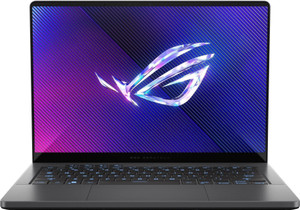
ASUS ROG Zephyrus G14 (2024, Ryzen 9 8945HS, RTX 4060, OLED)
Want the full ranked list with filters and live prices?See all laptops ranked ›
What actually matters when buying laptops
What to expect at each budget
Who it’s for — the right laptops by person
Common mistakes to avoid
- Buying on processor name alone without checking the generation - an old i7 can be slower than a new i5. Always ask which generation the chip is and prefer the latest available.
- Skimping on RAM to save a few thousand rupees. 8GB feels tight within a year or two; 16GB is worth the small premium and dramatically extends the laptop's useful life.
- Paying for a dedicated gaming GPU you'll never use. If you don't game or edit video, integrated graphics are plenty and give better battery life.
- Ignoring the display. A dim, washed-out TN screen ruins the daily experience no matter how good the internals are - always check for a Full HD IPS panel.
- Assuming Windows and MS Office are included. Many cheap laptops ship without a genuine OS or Office; factor those costs in before comparing prices.
- Falling for 'sale' prices without checking history. Some discounts are on inflated MRPs. Track the price for a couple of weeks before a big sale to know the real deal.
Tips for buying in India
- Time your purchase with big sale events - Flipkart's Big Billion Days and Amazon's Great Indian Festival (around Sep-Nov), plus Republic Day sales in January. Bank card discounts and no-cost EMI during these events can cut effective prices meaningfully.
- Check service centre reach for your city before buying a brand. In smaller towns, some brands (like Dell, HP, Lenovo, Asus) have far better service coverage than others; a great laptop with no nearby service is a headache.
- Consider onsite/extended warranty and accidental damage protection for laptops you carry daily. It often costs a few thousand rupees but saves a lot if the screen cracks or the motherboard fails after year one.
- Buy from authorised sellers (brand stores, Flipkart/Amazon official listings, or reputed local dealers) to ensure valid warranty. Grey-market or imported units may not be serviced in India.
- Stack the deals: combine sale price + bank card offer + no-cost EMI + exchange bonus for your old laptop. Also ask about student discounts (many brands offer them with a valid ID).
- Match the exact model/SKU number, not just the name, when comparing prices. The same 'HP Victus' or 'Lenovo IdeaPad' name covers many variants with different CPUs, RAM and screens, so line up the full model number across Amazon, Flipkart and offline before deciding which is actually cheaper.
- Consider Amazon Renewed or brand-certified refurbished units for more laptop per rupee. A renewed business laptop with a seller warranty can beat a new budget model on build and performance, but buy only listings that clearly state a warranty and grade, and avoid unbranded 'refurbished' sellers.
- Prefer a laptop that charges over USB-C Power Delivery. It lets you top up from a compact charger, a phone charger or a PD power bank, which is genuinely useful on trains, in the office and during power cuts, and saves carrying a bulky barrel adapter.
- Insist on a proper GST invoice and store it safely. You need it for warranty claims across India, and if you are self-employed or run a business, a GST invoice lets you claim input tax credit, effectively lowering the real cost of the laptop.
Frequently asked questions
Is 8GB RAM enough in 2026, or should I get 16GB?
8GB works for light use - browsing, Office, video - but you'll notice slowdowns with many tabs or apps open. 16GB is the recommended sweet spot for most buyers and keeps the laptop smooth for years. If the RAM is soldered (not upgradeable), definitely get 16GB upfront.
MacBook or Windows laptop - which should I buy?
MacBooks (M-series) offer superb battery life, quiet performance and build, and are great for general use, coding and content creation - but cost more and have limited gaming and India-specific software support. Windows laptops offer far more choice, better value, easier repairs, and run all software including games. Choose Windows for flexibility and budget; Mac for battery, ecosystem and resale value.
Should I wait for a sale to buy?
If you're not in urgent need, yes. The Big Billion Days and Great Indian Festival (roughly Sep-Nov) and Republic Day sales (January) offer the best combination of price cuts, bank offers and no-cost EMI. Just verify the discount is real by tracking the price beforehand rather than trusting the crossed-out MRP.
Do I need a gaming laptop if I only game occasionally?
No. Casual games run fine on integrated graphics found in regular Ryzen 5/Core i5 laptops. Dedicated gaming laptops are heavier, noisier, have worse battery, and cost much more. Only buy one if you play demanding titles regularly or do video/3D work.
Is a laptop bought online genuine and will the warranty be valid?
Yes, as long as you buy from the brand's official store or the official listing on Flipkart/Amazon. Warranty is honoured across India regardless of where you bought it, as long as it's an authorised Indian unit. Avoid third-party sellers with prices that look too good and keep your invoice safe for warranty claims.
How long should a laptop last, and how can I make it last longer?
A well-chosen laptop should comfortably last 4-6 years. To extend its life: buy 16GB RAM and a 512GB+ SSD upfront, keep it cool and dust-free, avoid cheap chargers, and don't buy the bare-minimum specs. Spending a bit more now on RAM and storage usually saves you from replacing the machine early.
Which laptop is best for a college engineering or CS student?
Get a current-generation Core i5 or Ryzen 5, 16GB RAM and a 512GB SSD in the Rs 60,000-80,000 range. Computer science students mostly need RAM and a fast SSD, not a gaming GPU, since IDEs, VMs and browser tabs eat memory. Mechanical, civil or design students running AutoCAD, SolidWorks or rendering software should stretch to Rs 80,000+ and pick a model with a dedicated GPU. Check what software your department actually requires before spending on a GPU you may not use.
What is a good first laptop for a school-going child?
Prioritise durability, a comfortable keyboard and a clear webcam over raw power: 8GB RAM and a 512GB SSD are plenty, at Rs 30,000-45,000. For younger children whose school runs entirely on Google Classroom and web apps, a Chromebook (Rs 25,000-35,000) is cheaper, simpler, more secure and has great battery, but confirm the school does not need full Windows software like Tally or specific exam apps first. Set up a child account with parental controls before handing it over.
What should I buy for elderly parents?
Go for a 15.6-inch laptop with a bright Full HD IPS screen for easy reading, a backlit keyboard with well-spaced keys, and a body light enough to carry around the house. A touchscreen 2-in-1 often feels more natural to someone new to computers. Around Rs 40,000-55,000 is plenty since they will mostly browse, video-call and watch content. Pick a brand with a service centre in their city and pre-install and log into their WhatsApp, video-call and banking apps yourself.
Chromebook or a Windows laptop for a student?
A Chromebook is cheaper, boots instantly, has excellent battery and is low-maintenance, but it only runs web and Android apps. It cannot run full Windows software such as Tally, AutoCAD, many college lab tools, or offline exam software. For a young child doing web-based classwork it is ideal; for a college student, a Windows laptop is the safer choice unless you have confirmed everything you need runs in a browser.
Best laptop for someone working from home or hybrid?
Video calls make or break the WFH experience, so prioritise a good 1080p webcam, a clear mic and 16GB RAM to keep calls, browser tabs and Office running smoothly, plus a Full HD IPS screen and 8+ hour battery for the days you go to office. Business series like Dell Latitude, HP ProBook or Lenovo ThinkPad add sturdier builds and onsite warranty that saves downtime. Budget Rs 60,000-90,000.